This is a preview of what will come next on box64 v0.4.6. Because developpement cycle of box64 is quite long, we thought we could preview some of the new or improve feature that come in the version before the release.
So here it is: Preview of the Improved Handling of non-4K pagesize.
What is non-4K pagesize
But first, lest quickly discuss about pagesize. Without entering into too much detail, lets say that the pagesize is the minimum size of memory to which the CPU can define attributes. For x86 machine, this size if 4k (or 4096 bytes), and has always been this size. In the mid-1980 when 80386 was introduced, having 1MB of memory was the norm, and memory was counted in megabytes, and reaching the theoritical maximum of 4GB for everyday computer took many years. On a 1MB system, 4k pagesize means you have 256 pages. Very easy to handle. On current system, that’s another story. A 16GB system have 4 millions 4k pages. That’s which other CPU architectures have decided to allow bigger pagesize. ARM can use 4K, 16K or 64K, while LoongArch has 4K & 16K and PPC have 64K. The selection is on the kernel, and for system that have the option, you can see 4k or 16k or 64k in the kernel when you do uname -a for example.
The issue here is that every executable you launch (Linux or Windows) is tailored for a 4K pagesize. Loading such file on a different (bigger) page size is tricky, because you might need to end a page and change attribute (like a read-only attribute) at an address that is not compatible with 16k pagesize!
The usualy solution to this problem is: either use a 4k kernel, or use a Virtual Machine (VM) or a microVM. While a 4k kernel is a sure solution, it’s not always available easily, so a microVM might be needed, to workaround the pagesize difference by simulating a 4k pagesize on top of a 16k kernel. While this works, it make things more complicated to use (with passtrhough solution for video) and introduce some slowdown.
Box64 non-4k support
Box64 support is not based on a microVM solution. Instead, box64 is spoofing the program being run into thinking this is a 4k system, by simulating the effect of 4k well enough so things just work.
So when you launch a Linux x86 program, the Loader will load the ELF in memory the same way as if it was on 4k system, but with some workaround for case were 4k is needed. Same for Windwos program, when wine/proton will load a program or dll, box64 will adapt the memory so the loading can work.
There a many small hack here and there to adapt the behaviour of memory function to a “fake 4k”
The result of this is that, on a 16k pagesize system, just using box64 now allow you to run more program and games than before. In fact, Steam is now running fine. And so are Wine & Proton. You can even play some games protected by DRM (like Denuvo).
No 100% of things are supported in 16k configuration, there are still some games that works fine on a 4k system and crashes on the same system with 16k kernel, but there is already a huge improvment worth noting.
Apple Silicon and Asahi
On of the system that is 16k pagesize only are the AppleSiicon machine running Asahi Linux. While it exist hacks to build a 4k kernel, it’s not something easy to do.
On Asahi, lastest box64 will allow you to run Steam and Launch game wihtout the need of any microVM. You will need to build Box64 from sources, but it’s really easy, and you just need a C compiler like gcc, along with git and cmake
From terminal, once you have everything, simply do:
cd
git clone https://github.com/ptitSeb/box64
cd box64
mkdir build
cd build
cmake .. -DCMAKE_BUILD_TYPE=RelWithDebInfo -DM1 -DBOX32=ON -DBOX32_BINFMT=ON
make -j6
sudo make install
sudo systemctl restart systemd-binfmt
And box64 will be installed and ready to run. Note that if you already installed other emulation solution, you might need to remove those before as they might interfered, with something like binfmt-dispatcher that might force redirection of binary to other emulation solution.
Once box64 is installed, you can install steam with this command:~/box64/install_steam.sh
It will download Steam bootstrapper and prepare a script in /usr/local/bin/steam . To launch steam, simply type steam and it should launch.
For better stability, it is advised to switch to SteamRT3, that is the full 64bits client. You need to select a Beta steam in the settings, then after the update go back to setting and select SteamRT3.
This video show the launching of Steam and then a Windows Game on a MacBook Pro running Asahi Linux.
LoongArch machines
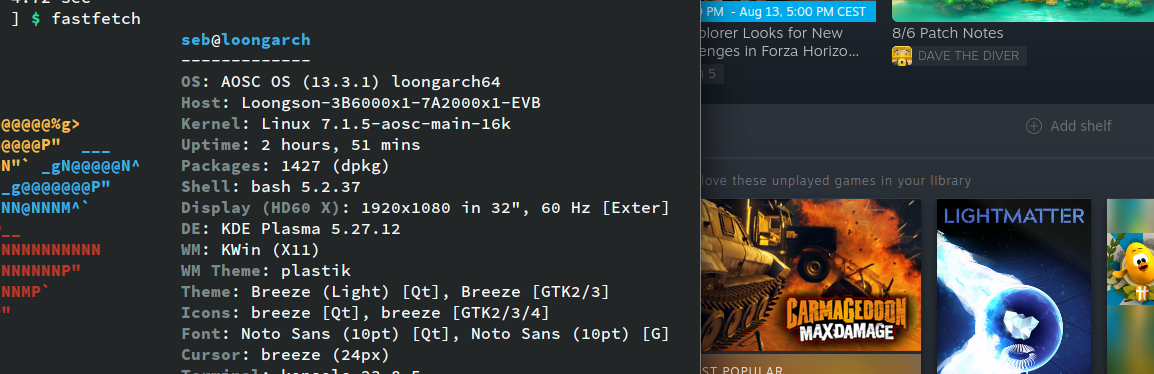
While LoongArch running AOSC have a 4k pagesize kernel option, this is kind of an exception and most OS on this hardware only have a 16k kernel size. Some laptop can also only run the 16k pageisze option reliably, so this system will benefit a lot from the improve compatibility.
If box64 is not package in the OS, it can be built very easily you just need a C compiler like gcc, along with git and cmake for that.
From terminal, once you have everything, simply do:
cd
git clone https://github.com/ptitSeb/box64
cd box64
mkdir build
cd build
cmake .. -DCMAKE_BUILD_TYPE=RelWithDebInfo -DLARCH64 -DBOX32=ON -DBOX32_BINFMT=ON
make -j6
sudo make install
sudo systemctl restart systemd-binfmt
And box64 will be installed and ready to run.
Once box64 is installed, you can install steam with this command:~/box64/install_steam.sh
It will download Steam bootstrapper and prepare a script in /usr/local/bin/steam . To launch steam, simply type steam and it should launch.
For better stability, it is advised to switch to SteamRT3, that is the full 64bits client. You need to select a Beta steam in the settings, then after the update go back to setting and select SteamRT3.
This video show the launching of Steam and a (DRM protected) Windows Games on a 3B6000 LoongArch machine with the default 16k pagesize kernel.
Conclusion
The box64 sources have been tagged to v0.4.5-1 so everyone can try those improvment early, before the v0.4.6 that will come in a few months